Comparison
CrestCast vs Emma
Emma is a spending tracker with a monthly budget on top: it tells you what you spent last month and how much of this month is left. CrestCast is a budgeting app that works forwards: it tells you what you can spend this month and still get where you are going. That is why CrestCast does not connect to your bank: it is not analysing the past, you type the plan.
| CrestCast | Emma | |
|---|---|---|
| Spending tracker or budgeting app? | Budgeting app. It plans what you can spend now against where you are going, ten years out | Spending tracker, with a monthly budget over the feed. Its Budgeting section plans and tracks spending over a set period, and the period is a month |
| What it tells you | What you can spend this month and still get where you are going | What you spent, by category, and how much of this month's budget is left |
| Which way it looks | Forwards, ten years, day by day | Backwards, and to the end of the current period. True Balance nets an account against known upcoming payments |
| Bank connection | None. It is not analysing the past, so it needs no feed: you type the plan, or import a CSV | Yes, through Open Banking. 2 connections on Basic, 4 on Plus, unlimited on Pro and Ultimate |
| Subscriptions | Not detected. You enter the ones you want in the plan | Found and cancelled from inside the app |
| Saving | Set a minimum to hold in the current account and an order for where anything above it goes | Autosave into Emma pots: round-ups, an amount Emma picks, or a fixed deposit |
| Net worth | Projected forward year by year, included | A current figure, on Pro and Ultimate only |
| Scenarios | Save versions of the plan and compare two side by side | None described |
| Household | Joint, personal and household views on one subscription | Ultimate adds up to 4 members at £5.99 each a month |
| Price | £79.99/yr for the household, which is £6.67 a month. 30-day free trial with no card | Basic is free. Plus £4.99/mo, Pro £9.99/mo, Ultimate £14.99/mo. Annual £41.99, £83.99, £124.99 |
Emma's prices and tiers correct as at 16/09/2026. Taken from Emma's own plan comparison page, with the rest of the row checked against its help centre and feature pages. Emma changes its plans from time to time, so check its site before you pay for a tier.
Emma is a trademark of its owner; this comparison is independent and is not affiliated with or endorsed by Emma.
A budget is a plan for money you have not spent yet
Emma's Budgeting section is a real budget for one month. You set a total, split it into categories, and Emma tells you how much is left and what you can spend per day before the period ends. The period, in Emma's own list, is the first to the last day of the month, the last working day, or a fixed monthly date. It plans with the current month's feed, and nothing on its site describes a view past the end of it.
A household's questions mostly do not fit inside a month. Whether the mortgage is still affordable when the fix ends. What one of you going part time does to the next five years. When the car finance is gone and what that frees up. Those are about money that has not moved yet, and a feed of money that has cannot answer them. CrestCast starts from what is coming, builds the next ten years from it day by day, and works back to what you can spend this month without missing any of it.
The fuller argument, with every UK app placed on its rung, is on budgeting app vs spending tracker.
What a budget that works forwards looks like
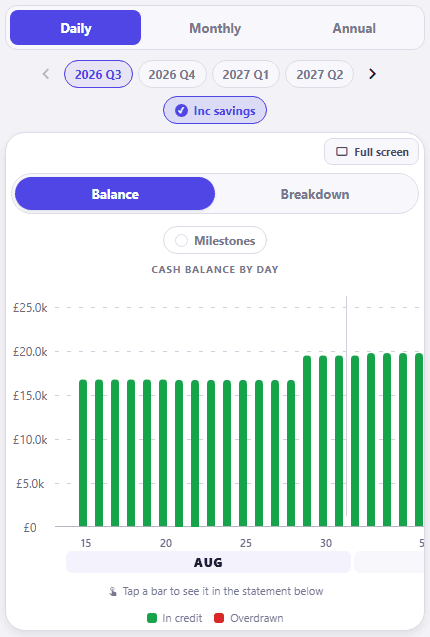
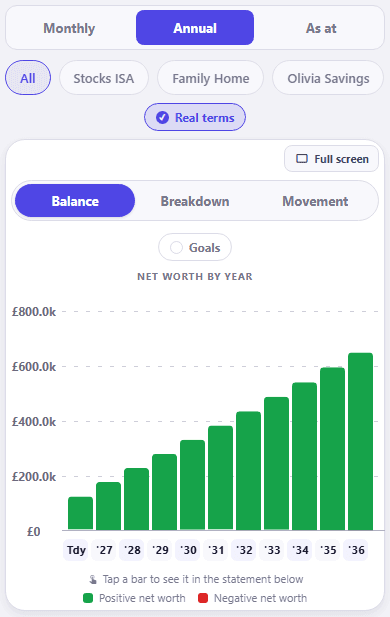
Figures shown are the sample profile, not a real household.
Where CrestCast is different
No bank connection, and the trade is deliberate. Emma will import and categorise your transactions; CrestCast asks you for the figures, and in return nothing reads your accounts and the model holds exactly what you chose. Here is why we built it that way.
No subscription detection, no spending categorisation and no round-ups. Emma does all three well, and they are all about money that has already moved. If one app has to do everything and last month matters more to you than the next five years, Emma is the better single choice. If a decision is coming that the past cannot answer, you need the budget that works forwards.
Which should you choose?
Choose CrestCast if the question is what you can afford: a bigger house in two years, one income for a while, a debt you want gone by a date, two incomes that need to be looked at as one household. It shows what the decision does before you make it, across your cash, your income and your net worth at once. Choose Emma if the question is where the money went: every account in one place, the subscriptions hunted down, and a monthly budget to keep this month on the rails.
If you already use Emma and want the forward half added rather than swapped, the Emma alternative page is written for exactly that.
Common questions
›Is Emma a budgeting app?
Emma calls itself one: its page titles read Emma Budget App, and it has a Budgeting section that, in its help centre's words, helps you plan and track your spending over a set period. That period is a month. You set a total, split it into categories, and Emma shows how much of each is left and what you can spend per day before the period ends. Everything it plans with is the current month's bank feed, and nothing on its site describes a view past the end of the period. On the test this site uses, what you spent versus what you can spend and still get where you are going, that is a spending tracker with a monthly budget on top. The label is Emma's to choose; the mechanism is what this page describes.
›What is the difference between a budgeting app and a spending tracker?
A spending tracker connects to your bank, sorts what you spent into categories and reports on it: last month, this month so far, and a limit you can set against either. A budgeting app plans money you have not spent yet. A budget is a plan for money you have not spent yet, so it needs a view of what is coming: the pay rise in April, the fix ending next June, the nursery place in September. CrestCast builds that view ten years out and tells you what you can spend this month without missing it. Emma tells you what you spent and how much of this month is left.
›Does CrestCast connect to my bank?
No, and the reason follows from the split rather than excusing it. A bank feed is the right way to find out what you spent, and CrestCast is not analysing what you spent. The numbers a forward budget needs are not in a transaction history: a pay rise you have been told about, a car you plan to replace in two years, a second child. So you type the plan, which takes an evening the first time, or hand it a CSV your bank exported and let it pick out the payments that repeat. In return no credential is shared and the model holds exactly what you decided.
›What does Emma do that CrestCast does not?
Quite a lot, and it is all about money that has already moved. Emma pulls in every account through Open Banking, categorises the transactions, finds the subscriptions you stopped noticing and cancels them from the app, rounds up your spending into pots, and on Pro and Ultimate tracks your net worth as a current figure. CrestCast does none of that. If the job is understanding last month, Emma is the better single choice.
›How much does Emma cost?
Checked on 16/09/2026 against Emma's own plan comparison page: Basic is free with two bank connections, then Plus at £4.99 a month or £41.99 a year, Pro at £9.99 a month or £83.99 a year, and Ultimate at £14.99 a month or £124.99 a year. Ultimate lets you invite up to four people at £5.99 each a month. Net worth tracking is on Pro and Ultimate, not Plus. CrestCast is £79.99 a year for the whole household, which works out at £6.67 a month: 30 days free, then 14 days after the first payment to change your mind, 44 days in all before any money is spent for good.
›Can I use Emma and CrestCast together?
Yes, and it is a sensible pairing: Emma to see where the money went, CrestCast to set what you can spend and still get where you are going. Nothing needs integrating and no data passes between them. A tracker also improves the forward budget, because it tells you what your recurring costs really are rather than what you assumed.
Other comparisons
- Budgeting app vs spending tracker →
The five rungs from a transaction list to a plan, and which UK app stands on which.
- CrestCast vs Plum →
An automated saver with a spending tracker attached, next to a budget that works forwards.
- CrestCast vs Snoop →
A bill-cutting spending tracker, next to a budget that works forwards.
- CrestCast vs YNAB →
A budget for this month only, next to one that runs ten years.
- UK money apps compared →
Snoop, Emma, Plum, Monzo, YNAB and PocketSmith: tracker or budget, and how far ahead each one looks.
- An Emma alternative for planning ahead →
For the reader keeping Emma and adding the part it does not do.
This is not advice
This comparison is independent and is not affiliated with, endorsed by, or sponsored by Emma or Emma Technologies Ltd. Details about Emma are drawn from emma-app.com and its help centre, checked on 16/09/2026, and may be out of date by the time you read this. Check Emma's own site for current features and pricing. Nothing here is financial advice.
Emma tells you what you spent. CrestCast tells you what you can spend and still get where you are going.
Both incomes, the bills, the mortgage and the children in one forward budget, ten years out, so the decisions that cannot be undone stop being guesses.
Try CrestCast free →30-day free trial, no card needed to start · 14 days to change your mind after you pay