How Couples Share One Plan in CrestCast
In most households one person keeps the money picture. How CrestCast lets the other see it without having to run it: one subscription, three settings, and what each one hands over.
In most households one person keeps the money picture up to date. The other wants to know it is handled, and to be able to look when a decision comes up. Sharing a plan should fit that shape, not turn two people into two bookkeepers.
Why a shared model matters at all is covered in why both partners need the same picture. This is how it works in CrestCast.
One Household, One Subscription
Each of you keeps your own login. One of you creates a household in Settings and invites the other, by email or with a 10-character code. An email invitation can only be accepted by an account with that address, and both the invitation and the code work for seven days. One subscription covers the household, so your partner does not need their own.
Three Areas, Three Decisions
Once you are linked, Settings shows who can do what, one row per area.
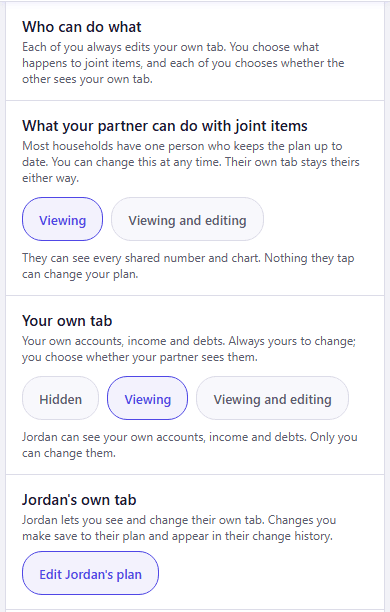
- Joint items: the accounts, bills and debts you share. Whoever set up the household chooses between Viewing and Viewing and editing, before or after the other joins. A new invite starts with Viewing. A viewer sees every joint figure and chart, and nothing they tap can change them: the database refuses the write, so it holds whatever screen it comes from.
- Your own tab: your own accounts, income and debts. Always yours to change. You alone choose whether your partner sees it: Hidden, Viewing, or Viewing and editing.
- Their own tab: the same choice, made by them. Settings tells you in a sentence what they have chosen.
The Usual Shape: One Keeps It, One Reads It
Say Alex keeps the plan. Alex leaves joint items on Viewing and shows their own tab, so Jordan can open the whole household forecast whenever they like, without being able to move anything by accident. Jordan sets their own tab to Viewing and editing, so when Jordan gets a pay rise Alex can put it in without Jordan having to log in.
Nobody has to learn the system for this to work. When a decision needs both of you, Alex opens a chart, shows the path, and the conversation takes minutes. And Alex stops being the only person who could answer a question about the household money: the answer is there for Jordan to read.
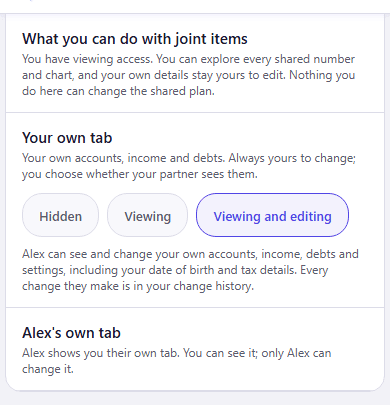
If you would both rather get into the numbers, set joint items to Viewing and editing and show each other your tabs. It is the same household with two editors.
What Viewing and Editing Hands Over
Viewing your tab shows your accounts, income and debts. Viewing and editing goes further. It lets your partner open your whole plan and change it, which means they can read everything in it, including your date of birth and tax details. Settings says so under the button before you choose it.
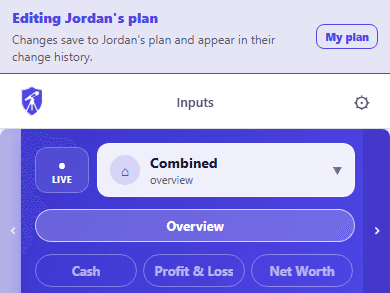
- Your partner opens your plan from their Settings, under a banner naming whose plan it is, and one tap takes them back to their own.
- Every change they make saves to your plan and is recorded in your change history under their name.
- If you use two-step sign-in, switching Viewing or Viewing and editing on asks for the second step. Switching it off never does, and takes effect straight away.
Worth Knowing Before You Start
- Each tab starts Hidden when a partner joins, and goes back to Hidden if either of you leaves. The choice is made once the person you are showing it to is actually there.
- A household links two adults. Children go into the plan on the Family screen and do not need a login.
- Only the person who set up the household chooses the joint level. Their partner sees in their own Settings which level they have.
- Whatever the joint level, each of you always edits your own tab.
- If one of you leaves, each keeps their own data and a copy of the joint items as they were that day. The copy stops updating.
- Sharing with a financial adviser is separate, and an adviser never sees your partner's side.
If you are taking the plan to an adviser, see what to bring to a financial adviser meeting.
›How to check this
The three screenshots were taken on 02/10/2026 from the current CrestCast web build, using two test accounts created for the purpose and deleted straight afterwards. Alex, Jordan and their figures are invented.
Every setting described here is in Settings > Household Sharing in the app.
One plan, whoever keeps it
CrestCast forecasts your household's cash, income and net worth ten years ahead from the numbers you type in. One of you can keep it and the other can read it, and one subscription covers you both.
30 days free, no card. Then £7.99 a month or £79.99 a year for the whole household.
Put your own numbers in and see the next ten years.
30 days free, no card. Then £7.99 a month or £79.99 a year for the whole household.