What to Bring to a Financial Adviser Meeting
A first meeting with a financial adviser is mostly questions. What they will ask, what to bring, and why a forecast of your own numbers makes the hour count.
This article is general information, not financial advice.
The first meeting with a financial adviser is mostly questions. Before an adviser can recommend anything, FCA rules require them to understand your circumstances and what you want to achieve, so the first hour goes largely on gathering facts. The more of those you arrive with, the more of the hour is left for the part you are paying for.
What that hour costs, and who can get it at all, is covered in what a financial adviser actually costs in the UK. This piece assumes you have decided to see one.
What They Will Ask
- What you earn before tax, how you are paid, and anything irregular, such as bonuses or self-employed income.
- What goes out each month, and the large costs that come once or twice a year.
- Every debt: the balance, the rate, and when any fixed rate ends.
- What you hold in cash, ISAs and other investments.
- Every pension you have, including schemes from old jobs.
- Any life cover or income protection, and whether you have a will.
- Who depends on you, and what is coming: children, a move, a change of job, retirement.
- How much investment risk you are comfortable with, usually through a questionnaire.
What to Bring
- Recent payslips and your last P60, or your last tax return if you are self-employed.
- The latest statement for every pension, and a State Pension forecast from the Check your State Pension forecast service on GOV.UK.
- Your latest mortgage statement: the balance, the rate, when the fixed period ends and any early repayment charge.
- Balances and rates for savings, ISAs, loans and credit cards.
- Your regular outgoings, which a few months of bank statements will show.
- The documents for any existing life cover or income protection.
That paperwork says what you have today. It does not say where it is heading, and that is usually the question that brought you in.
Why a Forecast Changes the Meeting
A pile of statements is a snapshot. The questions people take to an adviser are about the years ahead: can we afford to overpay the mortgage, what happens when the fix ends, will the savings last through a year of parental leave, when is the car loan gone. A forecast of your own numbers turns the snapshot into a direction, with dates on it.
- The dates that matter: when each debt clears, when a fixed rate ends, when a cost like childcare stops.
- The tight months: the points where cash runs low, which a monthly average hides.
- A sharper question. If you have already run the options you are weighing, you arrive knowing what each does to your cash and your net worth, and the adviser can spend the time on what needs advice: which products, which wrappers, in what order.
It works after the meeting too. Put what you agreed into the plan and see what it does to the next ten years, next to everything else you already have planned.
Taking Your Forecast With You
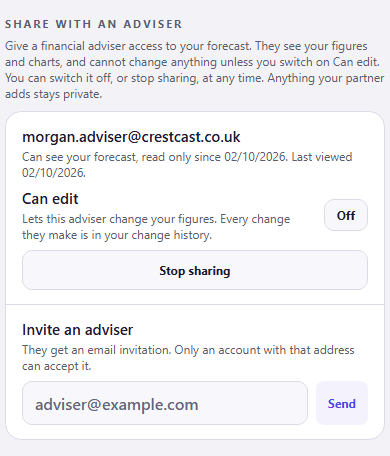
CrestCast lets you share your forecast with an adviser, view only by default. In Settings, under Share with an adviser, type their email address and they get an invitation. They accept it signed in to a CrestCast account with that address, then open your forecast: the figures you entered and every chart built from them, under a banner that says whose forecast it is.
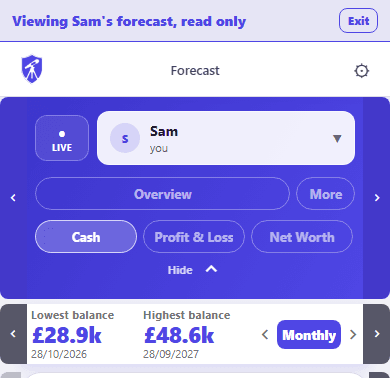
By default they cannot change anything. If you want them to update figures for you, switch on Can edit for that adviser: every change they make is in your change history, and you can switch it off at any time. Your side of it stays in Settings: who can see your forecast, since when, when they last looked, and one button to stop.
What They Can and Cannot See
- Your figures, not your partner's. In a shared household, anything your partner has entered stays private. If the meeting is about both of you, your partner can send their own invitation from their Settings.
- Your live plan only. Saved versions, past copies of your forecast and your change history are not shared, so if you want to discuss an option you saved as a version, walk them through it in the meeting.
- Nothing changes unless you allow it. Without Can edit they cannot change a figure, and either way exports are refused while they have your forecast open, so they cannot download your data from the app.
- You can take the numbers yourself. Settings exports your forecast tables as an Excel file and every dated payment as a CSV, so you can send them ahead of the meeting if your adviser wants them on file.
- They need a CrestCast account with the exact address you invited; nobody else can accept it. They do not need a subscription of their own to view your forecast.
- An invitation works for seven days. If it lapses, send it again.
- You can stop sharing at any time from the same place. It takes effect straight away, and a forecast they already have open closes within a minute.
- If either of you deletes your account, the access is deleted with it.
If you are still weighing whether you need advice at all, planning before, between or alongside an adviser sets out when a regulated adviser is the right route and what you can answer from your own numbers first.
›How to check this
The two screenshots were taken on 02/10/2026 from the current CrestCast web build, using two test accounts created for the purpose and deleted straight afterwards. Sam and the figures are invented, and the adviser address is our own.
The list of what an adviser asks is typical of a first meeting and varies between firms. The State Pension forecast service is on GOV.UK. CrestCast is not a financial adviser, is not authorised to give regulated financial advice, and makes no recommendations.
Arrive with a plan of your own
CrestCast forecasts your household's cash, income and net worth ten years ahead from the numbers you type in, and shows when each debt clears. Share it with your adviser and the meeting starts from your figures. One subscription covers the household.
30 days free, no card. Then £7.99 a month or £79.99 a year for the whole household.
Put your own numbers in and see the next ten years.
30 days free, no card. Then £7.99 a month or £79.99 a year for the whole household.